
Why can the same taxi journey produce different results on two calculators? The route, travel time and pricing method can all affect the calculation. If you’re searching for “how to estimate taxi fare before journey”, start by gathering accurate pickup and destination details. Godalming Airport Transfers Express (GATE.taxi) specialises in pre-booked and on-demand taxi journeys from Godalming and surrounding areas.
A clear figure can make it easier to plan transport, but a calculation is only as relevant as the details entered. This guide explains what information to prepare, why calculators can return different results and how to review a calculation when your route or plans change. It also explains how the GATE.taxi Fare Calculator calculates the fare GATE.taxi charges for the journey details entered. Customers can submit a booking through the calculator for local journeys, airport transfers and longer trips.
Why estimate a taxi fare before your journey?
A taxi fare calculation is based on the journey details supplied and the method used by the calculator. It can help you plan transport, but different tools may return different results because they use different routes or fare information. There is no single calculation that applies to every taxi journey.
For a Godalming taxi journey, a general calculator may produce a figure using its own route and fare information. That result is not necessarily the fare charged by a particular operator. The GATE.taxi Fare Calculator calculates the fare GATE.taxi charges for the details entered. Knowing which tool produced a result helps you understand what it represents.
What does a taxi fare estimate tell you?
A calculator’s result relates to the journey details entered and the way that tool processes them. A tool may use route distance, journey time or specific fare information. Another may use a different route or calculation method. So even when pickup and destination details match, results may differ if the tools make different assumptions.
Some taxis use a meter that calculates charges as the journey progresses. An online calculator may instead use route and fare information for the details supplied. For background on the role of distance and time in metered fares, see How a Taximeter Works. A general calculator’s result should not be mistaken for a calculation from a named operator.
When is it useful to check before travelling?
Checking before travelling can help you think through the arrangements for a local trip, a journey to Godalming station or a longer journey from Surrey. For an airport transfer, entering the planned pickup and airport destination gives you a clearer basis for planning the trip.
Consider the practical details as well as the calculation. Decide where the pickup should be and whether you need to include any stops or a return leg. If you compare calculators, enter the same details each time and note which tool produced each result. This makes the comparison more useful without assuming that every tool uses the same method.
First decide what you need the calculation to tell you. A general calculator returns a result based on its own method; an operator-specific calculator calculates that operator’s fare for the details entered. GATE.taxi provides local journeys, airport transfers and long-distance taxi travel from Godalming and surrounding areas.
How taxi fare calculations use your route and journey details
A calculator needs a clear journey to calculate a result. Pickup and destination details help identify the route, while some calculation methods also use journey time and fare information. A different route, an extra stop or a changed destination can therefore change the journey being calculated.
Accurate route details help a calculator assess the journey you actually intend to take. If your plans are not final, remember that an early calculation reflects only the details entered at that point.
Why pickup and destination details matter
Enter locations as clearly as the calculator allows. A town name alone may leave several possible pickup or destination points. A full address, station or recognised place makes it easier to identify the intended locations. For a trip from Godalming to elsewhere in Surrey, use the actual pickup and destination rather than a broad description such as “near the town centre”.
Check that the locations are in the right order. Reversing pickup and destination describes a different journey. If you plan to stop before reaching your final destination, include the stop where the tool allows it. Otherwise, the result may describe a direct journey rather than your full route.
How route and time information can influence a result
Calculation methods vary. A tool may use route distance, journey time or both, alongside its fare information. A result based on one suggested route may differ from one based on another route, even when the start and end points are the same.
Traffic can affect how long a journey takes, while a route change can alter the distance or time used in a calculation. These are possible reasons for variation, not automatic extra charges. The effect depends on the calculator’s method and the information available to it. Do not assume every tool updates its result in the same way.
- Use a specific pickup point, such as a station entrance or full address.
- Enter the destination you plan to reach, not just a nearby area.
- Add stops or a return leg if the calculator asks for them.
Before using a result to plan, review the route summary and check that it matches your intended journey. If the pickup, destination or stops change, enter the revised details. For a journey from Godalming, the GATE.taxi Fare Calculator calculates the fare GATE.taxi charges for the details entered.
How to interpret different taxi fare calculations
Different results do not automatically mean that one tool is wrong. Each calculator applies its own method to the journey details entered. A comparison service may display results from several providers, each using its own fare information and approach. These formats answer related but distinct questions: one gives the result from a particular tool, while the other lets you review several results together.
Single-calculator results and multi-provider comparisons
A single-calculator result relates to the journey entered and that tool’s method. A multi-provider comparison can show several results side by side, but those figures may be based on different providers’ information or assumptions. Neither format is universally better. Decide what you need to compare, then check that each result refers to the same journey before drawing conclusions.
What to check when results do not match
Start by comparing the inputs. Check the pickup and destination, then confirm that you entered the same stops and return details in each tool. Even a small difference can make the results unsuitable for direct comparison. Look for any explanation of what each calculation includes or how it determines a route.
For example, one tool might calculate an outward trip while another includes a return leg. Their route assumptions or fare information may also differ. A general calculator and an operator’s calculator may use different sources. Without knowing how a tool works, a different result alone is not enough to conclude that it is inaccurate.
Use a like-for-like check before comparing:
- Match the pickup and destination locations.
- Enter the same stops and return details, where relevant.
- Review any explanation of the tool’s calculation basis.
Once the inputs match, interpret each result in context. A comparison can show the results returned by its listed providers, while a single calculator gives you the output of that specific calculation method. These are different ways of reviewing a journey, and they do not have to produce the same figure.
If you are deciding how to estimate a taxi fare before your plans are fixed, keep a note of the journey details and which tool produced each result. That makes it easier to repeat the calculation if your plans change. For a journey with GATE.taxi, its Fare Calculator calculates the fare GATE.taxi charges for the journey details entered, and customers can submit a booking through it.
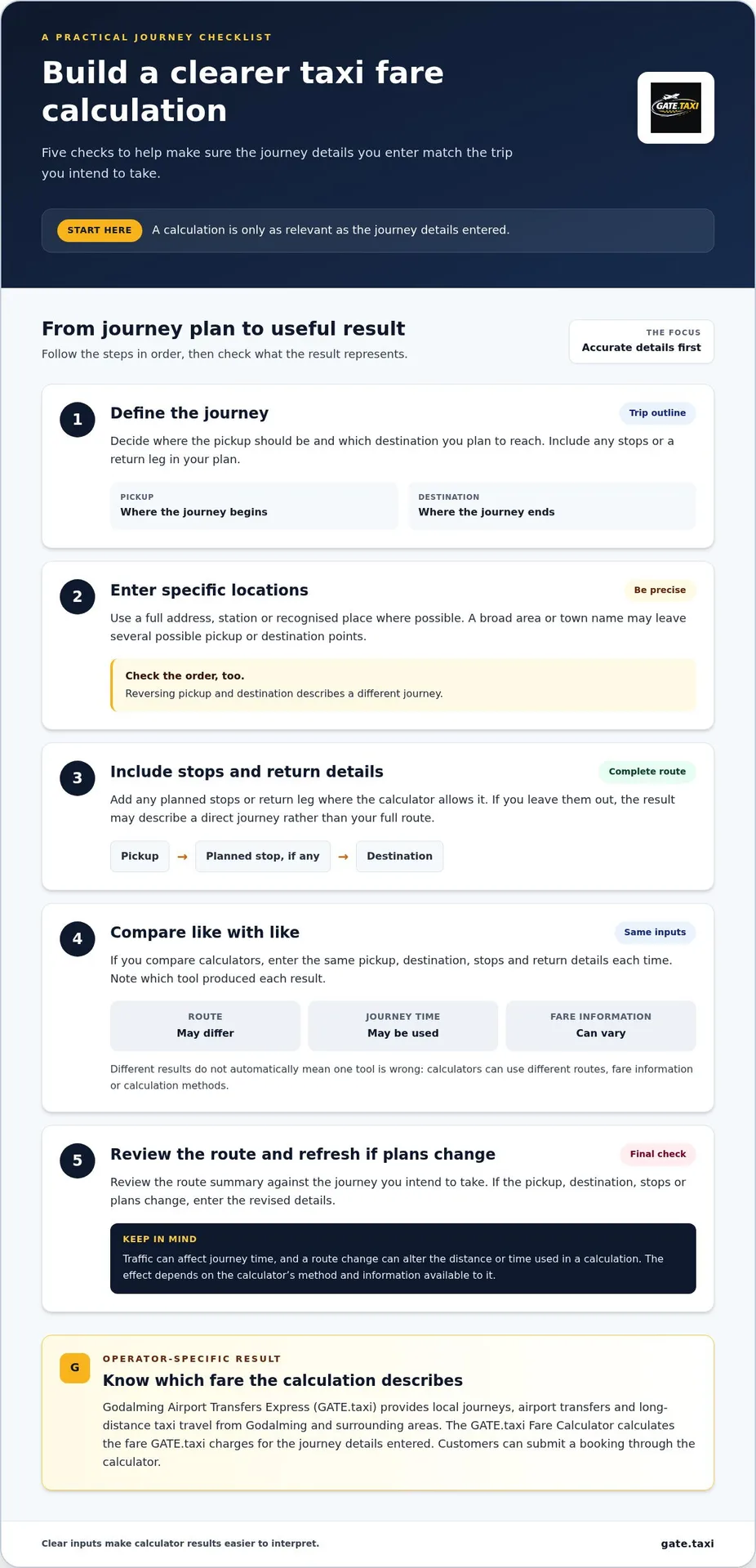
How to estimate your taxi fare before setting off
Organising your journey details makes a fare calculation more useful. Decide where the trip starts and ends, then note any stops or return travel. For example, you might travel from a specific address in Godalming to a station or another Surrey destination. Use the planned locations rather than a general area name wherever the calculator allows.
Prepare the details before using a calculator
Check the spelling and full details of both locations before entering them. If you are travelling to an airport, enter the airport as your destination and use details that match the journey you intend to take. GATE.taxi provides airport transfers and long-distance journeys from Godalming and surrounding areas.
Decide whether you need a one-way journey or a return, and note any stops along the way. If a calculator provides separate fields for these details, fill them in rather than relying on a single destination field to represent a more involved route.
Review the result against the journey you plan to take
After entering your details, check the journey shown by the calculator. Confirm that the pickup, destination, stops and direction of travel match your plans. If the tool has selected the wrong location, or your plans have changed, update the details and calculate again. Results based on different journeys are not useful for a like-for-like comparison.
- Define the trip. Decide the pickup point, destination, any stops and whether you need a return journey.
- Enter the details. Use clear location information and complete each relevant field.
- Review the result. Check that the route and journey details match what you entered.
- Keep the details. Note the journey information used so you can refer to it or repeat the calculation if your plans change.
For a local journey, specify a Godalming address and a named destination nearby. For a longer trip from Surrey or an airport journey, use the actual endpoint rather than a nearby landmark. If you change from a direct trip to one with a stop, revise the details before reviewing the result.
This gives you a practical way to estimate a taxi fare before your plans are settled: enter a clear version of the trip, check what the calculator has used and update the details if essential information changes. For a GATE.taxi journey, use its Fare Calculator to calculate your fare from the details you have prepared.
Using the GATE.taxi Fare Calculator for a journey from Godalming
A general taxi calculator and an operator’s calculator serve different purposes. For journeys in and around Godalming, the GATE.taxi Fare Calculator calculates the fare GATE.taxi charges for the journey details entered. Its result relates to those details and GATE.taxi, rather than combining fare calculations from several providers.
GATE.taxi specialises in pre-booked and on-demand travel from Godalming and surrounding areas, including local journeys, airport transfers and longer trips. Enter the journey you intend to take, whether it starts locally or continues farther afield. The fare calculated applies to the information entered, so use details that match the trip you are considering.
What the GATE.taxi Fare Calculator is for
The calculator gives you an operator-specific way to calculate a GATE.taxi fare. Use it when you want to consider a journey with GATE.taxi, rather than treating a general calculator’s result as if it applied to every taxi provider. Enter the relevant pickup and destination, along with any other journey details requested.
A trip from Godalming to a local destination and an airport transfer are different journeys, so enter the details for the specific trip you have in mind. If a key detail changes, such as the destination or a stop, update the journey information so the calculation corresponds to your revised plan.
Continue to a relevant journey or booking
After reviewing the calculated fare, customers can submit a booking through the GATE.taxi Fare Calculator. Before proceeding, review the details once more so the booking relates to the journey you intend to take.
Keep the journey information straightforward and specific:
- Enter the planned pickup and destination.
- Include stops or return details if requested.
- Review the details before submitting a booking.
You can use the calculator for local travel as well as journeys from Godalming to airports and other destinations. When comparing results, distinguish a general calculator’s result from the fare GATE.taxi calculates for the details entered. Each reflects its own source and method.
For a GATE.taxi journey, use the Fare Calculator to calculate your fare and submit a booking with your journey details.
Make your next journey easier to plan
A useful calculation starts with a journey you can describe clearly. Keep the pickup point and destination together with any stops or return details. If your plans change, update those details before calculating again. This gives you a consistent starting point and helps you check that the result relates to the journey you intend to take.
That is a practical way to estimate a taxi fare before your plans are final. Use a general calculator to review its result, or an operator’s calculator to calculate the fare for the details entered. For a journey from Godalming or nearby areas, including Farncombe, Milford, Witley, Elstead, Chiddingfold, Dunsfold, Cranleigh, Ewhurst, Alfold, Grayswood, Grayshott, Hindhead, Guildford and Haslemere, explore the GATE.taxi Fare Calculator. Enter your planned trip to calculate the fare GATE.taxi charges, then submit a booking through the calculator if you are ready to proceed.
Frequently Asked Questions
How much information do I need to estimate a taxi fare?
Have the pickup and destination details ready, then provide any other information the calculator requests. This may include stops or a return leg. For example, if you are travelling from Farncombe to Guildford, use those specific locations rather than broad area names. Different tools ask for different inputs, so complete the fields shown. The closer the details match your planned journey, the more relevant the result is to that trip.
Can I estimate a taxi fare without an exact pickup address?
You can enter a clearly identifiable location, such as a named station or landmark. A broad description may not identify the pickup point precisely enough for a tool to select the route you mean. If the result appears to relate to a different place, refine the location and calculate again. For a fair comparison, make sure each tool uses equivalent pickup and destination details.
Do all taxi fare calculators use the same method?
No. Each calculator may use its own fare information and route method, while a comparison service may present results from multiple providers. Read the tool’s description to understand what its result represents. A single result and a set of provider results are different types of information. Matching the journey details can help explain a difference, but it does not mean one method is correct for every journey.
Can traffic affect a taxi fare calculation?
Traffic can affect a calculation if the tool uses journey time, but the effect depends on its method. The planned route and actual road conditions may also differ. If a calculator explains how it handles time or routes, use that information when interpreting its result. Do not assume every tool applies the same formula or that a change in traffic automatically means a particular charge.
Should I calculate a return taxi journey separately?
Check how the calculator handles return travel. If it has a return-journey field, enter the details there. If it asks for separate journeys, calculate each leg with its own pickup and destination. For example, the return pickup point may differ from where the outward trip ends if you plan to stop elsewhere. Do not assume the return calculation is simply double the outward one unless the tool says so.
Can I submit a booking through the GATE.taxi Fare Calculator?
Yes. Enter the requested journey information, review the fare GATE.taxi calculates for those details, then follow the booking steps shown. Customers can submit a booking through the calculator. This is useful for journeys from Godalming and nearby areas, including Farncombe, Milford and Witley. If a key detail changes before you proceed, update the journey information so it reflects the trip you intend to book.